Sensor Board
Source: sensor_board
The sensor board application is a simple flight computer for model rocketry.
AURORA is built to run on multiple interconnected PCBs that communicate over CAN
bus, i2c or other fieldbus technologies.
sensor_board manages the IMU and barometric sensor data, uses the flight state
machine, pyrotechnic ignition, hardware notification and data logging and is
designed to deploy a parachute when the model rocket reaches apogee.
Operating the Board in the Field
This section walks through what actually happens on the launch site, from the moment you flip the power switch to the moment you walk back from recovery. It is written for the person standing next to the rocket, not for the firmware developer. For the internals, see the sections further down.
What the board is telling you
The board talks to you through two channels: a buzzer and one or more status LEDs. There might be no screens on the launchrail, so it is worth getting used to both before the first real flight. The two backends signal the same flight states, so you can rely on whichever is more practical for the conditions (LED in a noisy crowd, buzzer once the rocket is out of sight).
Buzzer, in broad strokes:
Boot sound: short jingle the moment the board is powered on. If you don’t hear this, the board is not running.
Calibration started beeps: two short, low beeps once the board begins its stationary IMU calibration window (it runs in the background during
IDLE, so this normally follows shortly after the boot sound, as soon as the rocket is standing still). Same pitch as the completion tone below, so both read as “calibration”; the rhythm tells them apart (two short = started, one long = done). You only hear this once perIDLEcycle: if the board restarts its window because you bumped the rail, it does not beep again. Hearing it a second time means the board went back toIDLE(e.g. it disarmed).Calibration complete tone: a single confirmation tone once IMU bias calibration finishes (it runs in the background during
IDLE). Pyros are not yet live until theARMEDbeep below.Calibration-finished tone, then arming beep: once calibration converges the board immediately plays a confirmation tone followed by a higher, longer beep as it moves into
ARMED— that second beep is your “pyros are now live” cue.Landed song: a longer tune that loops after touchdown and keeps going until you disarm or power down. This is your recovery beacon and shall help you find the rocket in a corn-field or a difficult place.
Status LED, in broad strokes:
Boot flash: solid ON for half a second, then off. Pairs with the boot jingle and confirms the board has come up.
IDLE: short, sparse pulses (about twice a second). The rocket is disarmed and safe to handle.
(No separate CALIBRATING state): IMU bias calibration runs in the background while the board remains in
IDLE; pyros are not yet live. The LED keeps theIDLEpattern throughout, so the calibration cues are on the buzzer only.ARMED: even, steady blink (long ON time, unlike the sparse
IDLEpulse). Calibration is done and pyros are live. If you see this from the launchpad walk-back, the board is ready.In-flight (BOOST through REDUNDANT): LED stays dark. This is intentional. It saves battery and avoids optical noise during flight.
LANDED: long pulses (mostly ON, brief OFF). Pairs with the landed song as a visual recovery beacon.
ERROR: solid ON without blinking. Service required.
Tip
The full pattern tables are in Buzzer Patterns and LED Patterns.
Note
The LED backend depends on the data logger being enabled. When the data logger is disabled, the LED stays dark. The buzzer is unaffected.
Step-by-step commissioning
The following sequence assumes a board that has already been built and flashed, with a charged battery and a µSD-card installed. Hardware-specific arming mechanisms (key switch, button, plug, …) differ per board. Check the board’s own page under Supported Boards and Shields for the physical detail.
Pre-flight check on the bench. Battery charged, µSD-card inserted, pyro channels wired but not yet connected to igniters. Confirm the rocket is in the disarmed state before going anywhere near the pad.
Place the rocket on the launchrail. Do this before arming. The board uses its first stable orientation as the reference for “vertical”, so any leaning or repositioning after arming will throw off the calibration. When you move the rocket in an armed state, make sure to disarm and rearm again when the rocket is in its final position before liftoff.
Power on. You should hear the boot sound and see the LED flash solid for about half a second, then drop into the slow IDLE blink. The board is now running but is still in the IDLE state. It will not react to motion yet. Once the rocket is standing still you will hear the two short calibration-started beeps: the board has begun its stationary calibration window. It runs in the background during
IDLE, so this happens whether or not you have armed yet.Connect the igniters. Only do this with the board powered on but still disarmed, following your range’s safety procedure.
Arm the board. Trigger the arming mechanism (the exact action is board-specific). The board stays in
IDLEuntil calibration has finished, so pyros are not yet live at this point. If you already heard the calibration-finished tone in step 3, arming moves it toARMEDright away.Hold still. Don’t bump the rail, don’t walk into the rocket, don’t re-aim. If the board detects motion during calibration (still
IDLE) it discards the in-progress window and restarts automatically from the next still sample — no need to disarm and re-arm for a single bump, though sustained shaking (a gusty rail) will keep resetting the window and delay completion. Calibration also finishes early on its own once the estimate stops improving, rather than always waiting for a fixed duration.Wait for the ready tone. Once you hear the calibration-finished tone followed by the higher arming beep, and see the LED switch to the slower, even
ARMEDblink, the board has finished calibrating, pyros are now live, and it’s waiting for liftoff. You can now clear the pad.Need to abort or re-aim? Disarm the board. It will return to IDLE. You can re-arm as many times as you like. The state machine just cycles back into
IDLEeach time, waiting on calibration if needed, which is by design. There is no “wasted” arming attempt.Launch. The state machine takes over from here: BOOST, BURNOUT, APOGEE (drogue parachute deployment), descent, MAIN, REDUNDANT and finally LANDED. See the state machine diagram for the full transition graph.
Recovery. When the board detects landing, it starts playing the landed song and the LED switches to the long-pulse landed pattern. Walk in the direction of the sound; if it is a bright day, the LED can also help once you are within line of sight. Once you’ve found the rocket, disarm or power down the board to silence it.
Note
Usually it is not a problem, but removing the µSD card from the board should only be done when the board is disconnected from the battery.
Things that commonly go wrong
Calibration takes a long time / never finishes. The board automatically restarts the calibration window whenever it detects motion, so persistent wind or vibration on a tall rail can keep it resetting indefinitely. It will always finish eventually (there’s a sample-count safety ceiling), but a long stall is a sign the rail isn’t stable enough yet. Disarm, wait for the rail to settle, and re-arm if it’s taking too long for your launch window.
Board disarms by itself. The rail is tilted past the disarm angle threshold (see Configuration below). Either re-aim the rail or relax the threshold for the campaign.
No landed song after recovery. Either the battery is empty, the µSD card filled up mid-flight and the board faulted, or the landing was not detected (e.g. it is still drifting under canopy in a tree). Check power and the data log before assuming a software issue.
LED stays solid ON without blinking. That’s the ERROR pattern, not a ready indicator. The board has hit an unrecoverable fault. Disarm, power down, pull the µSD card, and check the log before flying.
LED never lights up at all. The LED backend depends on the data logger; if the logger is disabled (or failed to mount the µSD card), the LED stays dark even though the rest of the board is fine. Listen to the buzzer to confirm flight state in that case.
Techical Aspects
Sensor Data Path
It’s a tricky situation trying to fetch data from all sensors at the exact same time and passing them on to the state machine, the state machine filter and the data logger. Here is a rough overview of how AURORA’s data is passed between threads to the state machine and the data logger:

Threads
sensor_board adds one Zephyr thread of its own:
Thread |
Guard |
Prio |
Stack |
Purpose |
|---|---|---|---|---|
|
|
6 |
4 KB |
Reads every configured sensor as it comes due, runs the state machine off the result and fires pyro channels on state transitions. |
One thread services all sensors rather than one thread per sensor, because they share an I2C bus whose controller driver may serialise concurrent transfers by spinning — two independent pollers would then burn CPU at each other on every colliding transfer. Owning the bus from a single thread removes the collision outright. Running the state machine on that same thread removes the hand-off as well: the samples are used where they are read, and no zbus round-trip or message-subscriber pool sits in between.
Priority 6 is preemptible, and deliberately placed above the data loggers (8, 9) so an SD write stall cannot cost sensor samples, and above the watchdog feeder (10) — if the flight thread ever spins, the feeder starves and the board resets, which is the correct outcome.
Each sensor is read on a deadline, at CONFIG_IMU_FREQUENCY /
CONFIG_BARO_FREQUENCY. Where CONFIG_IMU_TRIGGER / CONFIG_BARO_TRIGGER
is set and the driver supports one, the sensor’s data-ready handler runs
first, on the driver’s own thread, and does the minimum the hardware
demands: it reads the sample off the chip and raises a flag. Everything
downstream of that — conversion, publishing, the attitude tracker, the state
machine, the loggers — still runs on state_machine, which picks the sample
up at its next deadline.
The read cannot be deferred with the rest. lsm6dso_handle_interrupt()
loops on STATUS_REG until both XLDA and GDA are clear, and only reading
the output registers clears them, so a handler that raised the flag and
returned would spin that thread forever — at a cooperative priority that
nothing, the watchdog feeder included, can preempt. SENSOR_CHAN_ALL is what
clears both; fetching only SENSOR_CHAN_ACCEL_XYZ leaves GDA set and hangs
just the same.
A sensor whose trigger cannot be installed logs a warning and falls back to being polled.
Note
To get an overview of running threads, use the Zephyr-Shell builtin command
kernel threads list.
Configuration
State Machine Thresholds
These options are defined in lib/state/Kconfig under the
State Machine => Flight thresholds (defaults) menu.
They are only the factory defaults. Different vehicles need different thresholds: a 200 m model and a 1 km vehicle disagree on every altitude and timeout in the set. So the running values can be changed per vehicle from the shell and are persisted across reboots. See the state machine threshold store; the application loads the stored set (falling back to these defaults) before starting the state machine.
Flight Thresholds
Option |
Unit |
Default |
Description |
|---|---|---|---|
|
m/s² |
30 |
Acceleration threshold for boost detection (ARMED -> BOOST). |
|
m |
50 |
Altitude threshold for boost detection (ARMED -> BOOST). |
|
m/s² |
15 |
Acceleration threshold for burnout detection (BOOST -> BURNOUT). |
|
m |
200 |
Descent altitude for main pyro event (APOGEE -> MAIN). |
|
m/s |
2 |
Velocity threshold for landing detection. |
|
deg |
85 |
Orientation threshold for arming (IDLE -> ARMED). 0 = horizontal, 90 = vertical. |
|
deg |
70 |
Orientation threshold for disarming (ARMED -> IDLE). |
|
n |
10 |
Number of consecutive samples for disarming (ARMED -> IDLE). |
Timers and Timeouts
Option |
Unit |
Default |
Description |
|---|---|---|---|
|
ms |
900 |
Duration that boost thresholds must be held before transitioning. |
|
ms |
500 |
Duration that landing velocity must be held. |
|
ms |
60000 |
Max time in APOGEE state before aborting to ERROR. |
|
ms |
2000 |
Delay between MAIN and REDUNDANT pyro events. |
|
ms |
900000 |
Max time in REDUNDANT state before aborting. |
Application Simulation
When built with CONFIG_AURORA_FAKE_SENSORS=y (typically together with the
native_sim board target), sensor_board replaces the real IMU and baro
drivers with a synthetic data source. Only the sample source changes: the
sensor thread still owns the schedule and reads the fake backend through the
same slot table it uses for hardware, at CONFIG_IMU_FREQUENCY /
CONFIG_BARO_FREQUENCY, publishing on the same zbus channels
(imu_data_chan, baro_data_chan). The thread layout of a simulated build
therefore matches a real one, and the state machine, filter, data logger and
pyro logic run unchanged.
Two backends sit behind the same shell interface:
Backend |
Kconfig |
Source of samples |
|---|---|---|
Synthetic profile |
|
Analytic ISA-troposphere flight profile generated on the fly. |
Replay |
|
Samples from a recorded |
Synthetic profile
The default profile follows an ISA-troposphere altitude/pressure curve with
a constant-thrust boost phase, a ballistic coast to apogee and a
constant-rate parachute descent. It is controlled from the Zephyr shell via
the sim command group:
Command |
Description |
|---|---|
|
Start the synthetic flight profile. The uptime at which this command is issued is used as t=0. |
|
Return the profile to pad-stationary (altitude 0, accel = +g on the vertical axis). |
|
Print the current flight time, altitude (m) and vertical proper-acceleration (m/s²), or |
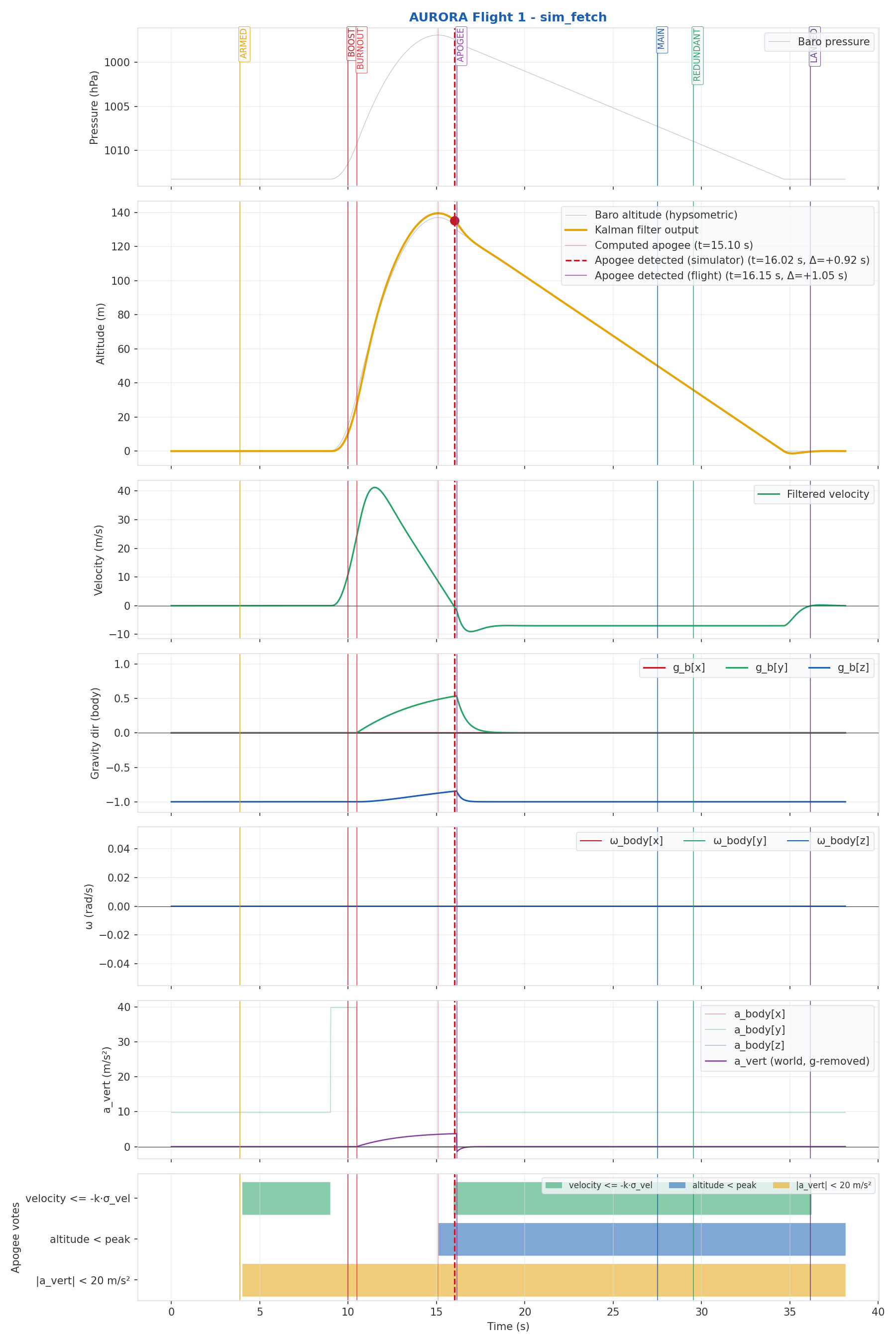
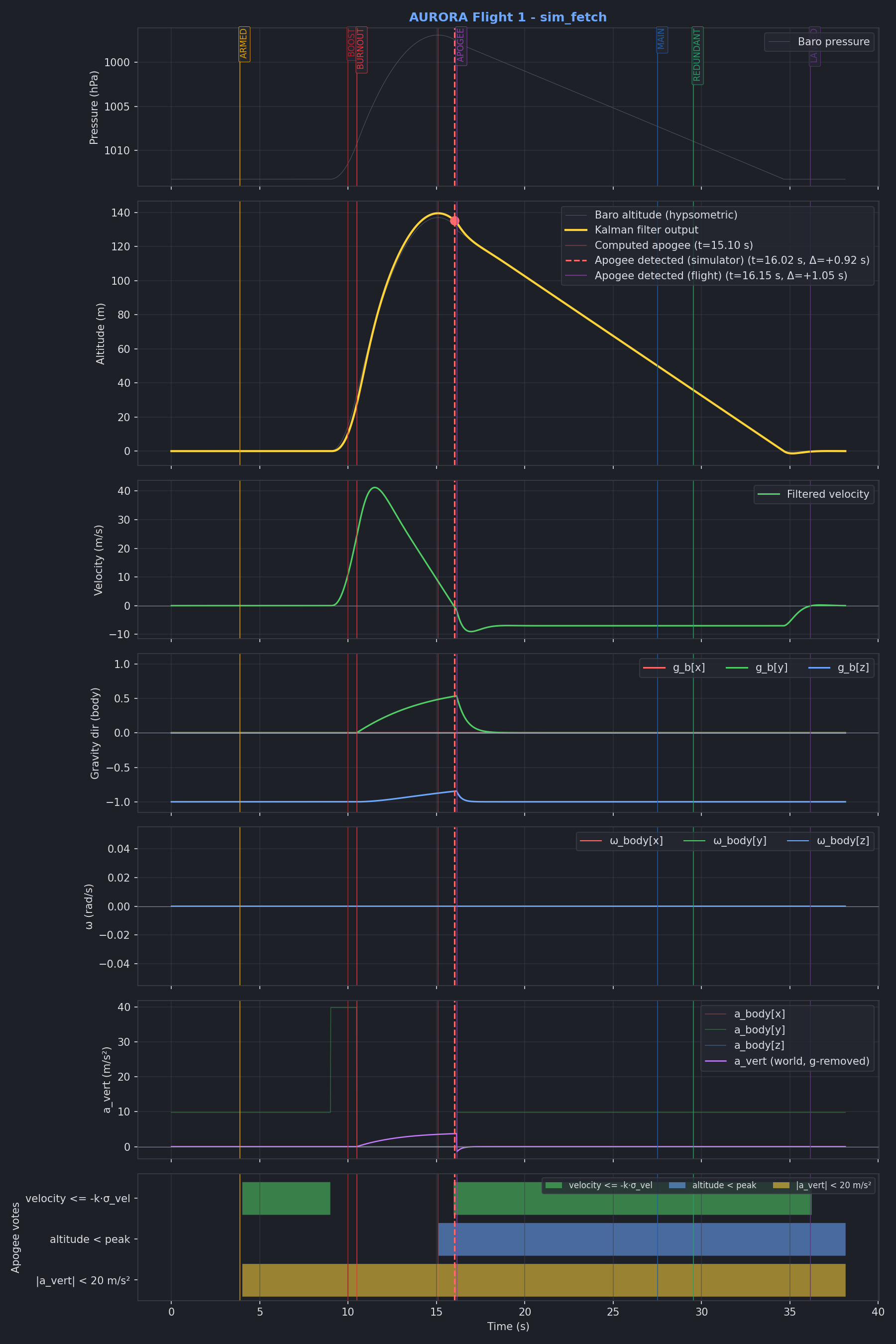
Using the native_sim board target, and the
sim_fetch.py tool, it is possible to run application
simulations and create graphs from the data_logger output:
Replay backend
Setting CONFIG_AURORA_FAKE_SENSORS_REPLAY=y swaps the analytic profile
for a playback engine that streams a previously recorded flight back into
the system at the original cadence. The samples are baked into the
firmware image at build time, so no filesystem or network access is needed
at runtime. Useful for CI runs and for regression-testing the Kalman
filter / state machine against known-good data.
The recording is selected via:
CONFIG_AURORA_FAKE_SENSORS_REPLAY_INPUT="flight_logs/<campaign>/<flight>/flights.csv"
(Paths are relative to the aurora module root.) During the build, the
gen_flight_replay.py tool turns the CSV,
and (if a sibling state_audit file is present) the trimmed
[BOOST - 4 s, LANDED + 4 s] window, into a generated replay_data.c
that is linked into the firmware.
Before launch, the replay backend keeps the rocket “pad-stationary” by
returning the very first recorded sample, so attitude calibration converges
as it would on the real hardware. Issuing sim launch from the shell (or
letting CONFIG_AURORA_SIM_AUTOTEST=y do it automatically) then starts the
playback.
Playback follows the recording’s own timeline: every fetch returns the
newest sample whose timestamp has already passed, exactly as reading a real
sensor returns whatever it holds at that instant. Sampling faster than the
recording repeats samples, sampling slower skips them, so keep
CONFIG_IMU_FREQUENCY / CONFIG_BARO_FREQUENCY at or above the rate the
flight was recorded at to see all of it.
Supported Boards and Shields
Since sensor_board is an auxspace internal project, only auxspace hardware
is tested with the application.
Sensor Board v2 - RP2040 / RP2350 flight computer
ESP32-S3 Micrometer - ESP32-S3 based board
Hardware Requirements
Any board that wants to run sensor_board has to provide the following
peripherals and wire them up via Zephyr chosen nodes. The chosen-node
names below are what the application looks up at boot. If a node is missing
the corresponding feature is silently disabled (or the build fails, in the
case of the sensors).
Requirement |
Chosen node |
Notes |
|---|---|---|
IMU |
|
6-DoF accelerometer + gyro. Needs at least >=100 Hz ODR to catch boost cleanly. Tested with LSM6DSO32. |
Barometric sensor |
|
Absolute pressure sensor for altitude. Tested with MS5607 and LPS22HH. |
Storage device |
|
µSD-Card or eMMC, at least 16 GiB. Flight computers often have no on-board storage, so an external card is required. |
FAT filesystem |
|
A |
Flight-log raw region |
|
A reserved raw region on the same storage device used by the data logger for high-rate writes. Needs ≥7 GiB (see the storage-access pattern caveats). |
Pyro driver |
|
At least two pyro channels (drogue/main) plus a redundant channel if you want the |
Battery |
- |
Sized for at least the longest realistic flight + recovery window. The |
Battery sense (optional) |
|
A divider on the pack, read as a |
PWM buzzer (optional) |
|
Passive buzzer driven via PWM. Used for boot, calibration, state-change and recovery cues. Optional - board still flies without it, but you lose the auditory cues. |
Status LED(s) (optional) |
|
One or more LEDs as children of a |
Arm/disarm input (optional) |
|
The remove-before-flight interlock: a GPIO-backed switch or magnetic key, asserted while it is installed (safe) and released to arm. Read directly by the state machine when |
Power-fail monitor (optional) |
|
A supply supervisor or comparator whose output is asserted while the rail is collapsing. Drives the powerfail mitigation, which closes out the flight log before power is gone. Optional - without it the storage card is unprotected against a sudden powerloss. |
Fieldbus (optional) |
- |
CAN, \(I^2C\) or similar, if the board is part of a multi-PCB AURORA stack. Not required for a standalone flight. |
Warning
µSD cards that do not contain a flight log will be formatted by the firmware. All previous data will be lost.